Transform Photos into Striking Art with Color Charcoal Sketch
In the world of digital art and photography, there's a constant search for tools that can bridge the gap between a standard photograph and a piece of fine art. We often look for that special effect that can add depth, emotion, and a unique stylistic flair without requiring hours of manual work. This is precisely where a well-crafted Photoshop action comes into play, offering a shortcut to professional-quality results. For those drawn to the raw, expressive nature of charcoal drawing but with a vibrant twist, the Color Charcoal Sketch Photoshop Action presents a compelling solution. It’s not just another filter; it's a sophisticated tool designed to deconstruct your photos and rebuild them with the textural quality of a hand-drawn sketch, all while preserving and enhancing the original color palette.
Understanding the Aesthetic: More Than a Simple Filter
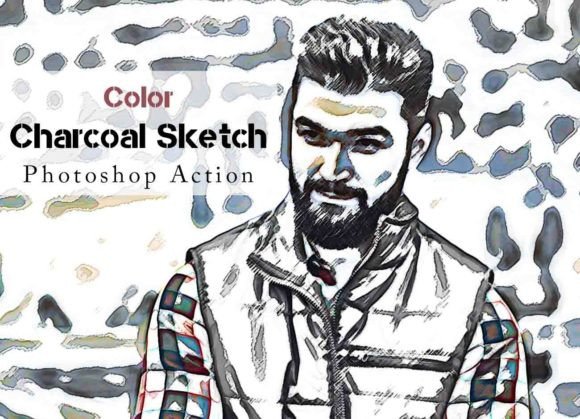
So, what exactly defines the "Color Charcoal Sketch" look? Imagine the rich, dark lines and soft, smudged gradients of a traditional charcoal portrait. Now, infuse that monochromatic image with the original, vibrant colors of your photograph. The result is a stunning visual hybrid. It retains the gritty, tactile feel of charcoal—the visible paper texture, the dynamic range from deep black to soft grey—but applies it as a luminosity and detail layer over the full-color image. This technique creates a powerful sense of depth and artistic interpretation. The personality of this style is both classic and contemporary; it feels timeless like a gallery sketch but pops with the energy of modern digital color. It’s a style that commands attention, making it ideal for projects where you want to evoke emotion and a sense of craftsmanship. The appeal lies in its ability to transform a simple snapshot into a piece of display art with a clear, handcrafted identity.
Practical Applications for Designers, Marketers, and Creators
The true value of any design asset is measured by its versatility. The Color Charcoal Sketch Photoshop Action excels in this regard, offering a unique aesthetic that can elevate a wide range of projects. For photographers, it’s a game-changer for creating artistic prints, unique client gifts, or standout portfolio pieces that separate your work from the competition. A wedding photographer, for instance, could use this action on a portrait to offer a bespoke, painterly album cover. For designers and brand strategists, this effect can become a cornerstone of a brand identity. It could be used to create a series of impactful hero images for a website, a set of social media graphics that stop the scroll, or even elements for packaging design that suggest artisanal quality and attention to detail.
Entrepreneurs and small business owners in creative fields—like boutique bakeries, handmade craft shops, or independent publishers—can leverage this style to build a cohesive and memorable visual language. Applying the action to product photos can give them a consistent, high-end feel that resonates with a discerning audience. Bloggers and content creators can use it to generate featured images that are not only beautiful but also stylistically consistent, reinforcing their brand with every post. The action’s ability to work on every photo and deliver a high quality result means you can integrate this powerful look into your workflow without a steep learning curve, thanks to the included video guide and user guide.
Integrating the Effect: A Guide to Effective Use
Adopting a new stylistic tool is about more than just applying an effect; it’s about integrating it thoughtfully into your creative process. The first step is always to consider your project's goals. Is the aim to create a bold, artistic statement or a subtle, textural enhancement? The Color Charcoal Sketch Photoshop Action is inherently bold, so it’s best suited for focal points like hero images, portraits, or key marketing visuals. It may be less effective for text-heavy layouts where readability is the primary concern, unless used as a background element with sufficient contrast.
A key feature of this action is the inclusion of 10 color options. This isn't just a gimmick; it's a practical tool for customization. After running the action, you can explore the organized layers and experiment with these color variations to find the perfect mood for your project—perhaps a warm, sepia-toned sketch for a vintage brand or a high-contrast, cool-toned version for a modern tech company. This level of control ensures the final output is not a one-size-fits-all filter but a tailored piece of art. For designers thinking about font pairing, this artistic style pairs beautifully with clean, simple typefaces. A strong sans serif font for headlines can provide a modern counterpoint to the sketch's organic texture, while a classic serif font can complement its timeless quality. The goal is to let the artful image be the star, supported by clear, legible typography.
Ultimately, tools like the Color Charcoal Sketch Photoshop Action empower creators to produce professional, gallery-worthy art efficiently. It’s a premium font equivalent in the action world—a specialized, high-quality asset that can significantly enhance your visual output. By understanding its aesthetic strengths and applying it with intention, you can unlock new creative possibilities, strengthen your visual branding, and deliver work that truly stands out. It’s a practical investment for anyone serious about elevating their digital art and design projects.